Someone asks about your place. "Do you have a website?" And you send them a link to your Airbnb listing.
It works. But it is not yours. It sits between other people's listings, it follows another company's rules, and it can change tomorrow. A host who works mostly through Airbnb told me they also want people to be able to find them directly. What they need is one simple page of their own: their real photos, a short video, their details and a button to message them. A page they can send to a friend, a past guest, or anyone who finds them on Instagram or Google Maps and asks, "Where do I look at this place?"
I have 15+ years in hospitality and travel, and I was General Manager of two hotels. I have built one of these pages for a family friend's mountain rental, as a client project. This article is the way I did it, including the places where AI went wrong.
I use Claude to plan and build, and Higgsfield to make the better pictures and the short video.
Why would a rental host want their own page?
Three reasons, and none of them is a promise.
- It is yours. Your photos, your words, your domain, your hosting account. Nobody else's layout around it.
- It gives people a place to ask you directly. Someone who hears about your place can look at it and message you. You can send the link to anyone who asks.
- Google can find it. A page about a real place, with its name, area and facts in plain words, is something a search engine can read. I cannot promise it will appear in any result, and nobody honestly can. It simply gives you a chance you do not have if you only have a listing.
When I showed the host their page, they said it was wonderful and thanked me very much. They also hope it will be found in search over time and bring some more business. That is their hope. It is not a result, and I am not claiming one.
What do you need before you start?
- Claude, on a computer: the website or the desktop app. You need to be able to add a custom connector. Check what your plan allows.
- Higgsfield, with a paid plan. It makes the pictures and the video, and every generation uses credits from your account. Check the current plans on its pricing page, because they change.
- Somewhere to put the page. A GitHub account (a free plan is enough to start). Open every account in the host's name.
- A domain name in the host's name. It has a small yearly fee.
- Your facts and your photos. If you are building it for someone else, their written OK for the photos and the site.
- Time. It took me about four to five hours in all. The video took the longest, because you go back and forth with a couple of prompts until it is right. That is my own time, not a promise for yours.
What three rules come before anything else?
1. The photos stay true. Better light and better colour are fine. Changing the place is not. Airbnb says it plainly in its ground rules for hosts. On 15 November 2026 I read this on Airbnb's own page, under "Listing accuracy":
"The place provided should be the one that was booked, and the photos and description on the listing page should accurately represent the space provided."
and:
"We will ask hosts to remove content if AI or other digital technology has been used to edit flaws, hide damage, add amenities or attributes that are not part of a listing, or otherwise misrepresent the listing."
Source: Airbnb, Ground rules for home hosts. That is Airbnb's rule for Airbnb listings, but it is a good rule for your own page too. A guest who arrives at a different place is the real problem.
2. Get the OK in writing. Only use photos you own or have the right to use. If you are building the page for a host, get their yes to the editing, the video and the website. A message reply counts if it says the right things.
3. Do not use the page to move Airbnb guests off Airbnb. The page is for people who find you somewhere else: Instagram, Google Maps, a friend, a past guest. Airbnb has its own rules about taking bookings off its platform, so read its current terms before you tell anyone to book outside it.
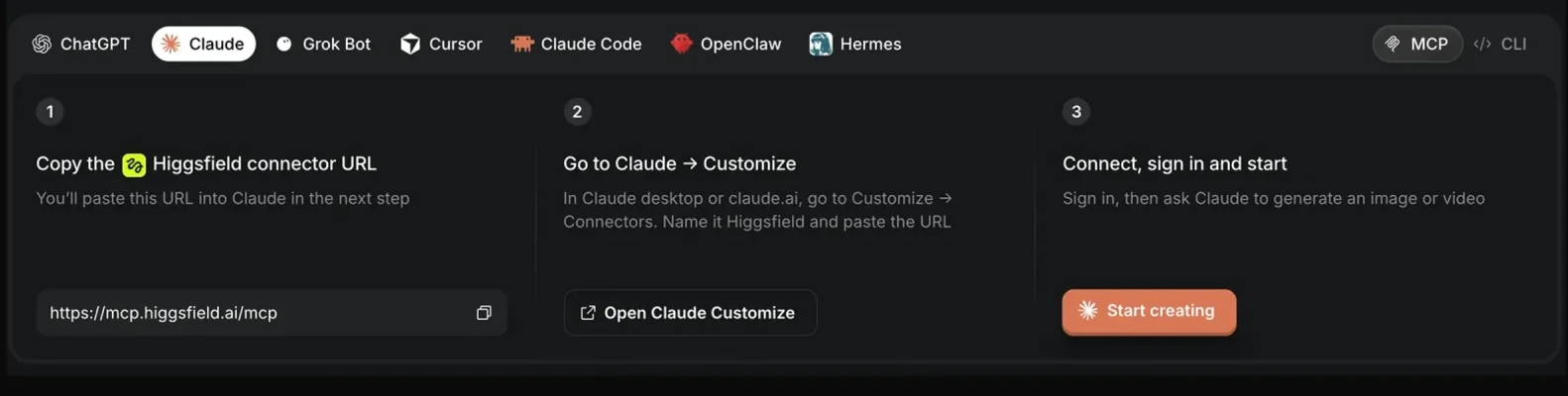
Step 1: How do you connect Higgsfield to Claude? (about 30 minutes)
A connector lets Claude call another service from the chat. With the Higgsfield connector, one conversation can plan the picture upgrades, generate them and report back. Without it, Claude can look at your photos and plan, but it cannot make the new pictures or the video.
- Go to higgsfield.ai/mcp and copy the link shown there:
https://mcp.higgsfield.ai/mcp - Check that your Higgsfield account is on a paid plan. I could not find a page that names a minimum plan for the connector, only "paid".
- In Claude, open Customize, then Connectors.
- Click Add, then Add custom connector. Name it Higgsfield, paste the link, click Continue, then Add.
- Sign in to Higgsfield when it asks. Then ask Claude to make an image or a video, to check it works.
Step 2: How do you upgrade the photos and make the video? (about an hour, uses credits)
Attach the host's photos to a new chat (the plus at the lower left, then "Add files or photos"). Make sure Higgsfield is switched on. Copy the prompt, fill in the brackets and paste it.
This prompt does two things. It makes Claude list what could look better in each photo. Then it has Higgsfield make one upgraded version of each, with strict limits: light and colour, nothing else.
I have the property owner's written OK to edit and publish the photos I'm attaching. They show one real place: [PROPERTY, e.g. a 2-bedroom loft in TOWN].

Work in this order. Ask me before each generation, and tell me what it will use if Higgsfield shows a cost.

1. Look at every photo. Give each one a name (for example "living room"). For each one, list what could look better: light, colour, sharpness, crooked lines, framing. Also list any clutter you can see (cables, bags, cups) and any damage, stains or wear. We will tidy the real room and re-shoot. We will not edit anything out.

2. Open the Higgsfield upload window so I can send these photos to Higgsfield.

3. Use Higgsfield to make ONE upgraded version of each photo. Rules, no exceptions:
- Keep the room, the layout, the furniture, the walls, the windows, the view and every feature exactly as they are.
- Only change brightness, white balance and colour, sharpness, straightening and a small crop.
- Do not add anything the place doesn't have: no furniture, art, plants, rugs, windows, views, pools, decor or people.
- Do not remove, fix, smooth or hide anything real: no marks, stains, scuffs, damage, wear, cables or clutter.
- Do not make the room look bigger, brighter or newer than it is.
- No text, logos or watermarks.

4. After each upgrade, tell me in words what changed (light, colour, crop) and confirm that nothing was added, removed or hidden. If something was, say what, and redo it.

5. Then ask me before you make the walkthrough. Make one short walkthrough video (about 10 seconds, landscape 16:9) from the upgraded photos only: a slow push-in or pan on each room, in a sensible order. No people. No rooms, objects or views that aren't in the photos. No on-screen text.

6. End with a list of the files and one line saying what each one is.
Notice the order. Claude asks before it spends credits, and it has to say in words what it changed. That is what keeps it honest.
Step 3: How do you check every photo and every frame? (about 20 minutes, the most important step)
AI image and video tools make up details that look real. This step is where you catch them.
In my own work, the AI did more than I asked. It:
- Moved the furniture or changed the layout of a room.
- Added a plant or a rug that was not there.
- Smoothed or fixed things, such as a stain or some damage, and even tidied a gutter.
- Made the room look bigger and newer than it really is.
None of that is an upgrade. It is a different place.
So do two checks:
- Each upgraded photo, next to its original. Look at the walls, windows, furniture, floor and the view. Count things. If anything is different, it goes back.
- The video, frame by frame. Pause it often. Video is where invented details hide, such as a door that was never there or a wall that moves.
Also think about what you see in the real room. If the original photo shows a stain or a broken tile, fix the stain or the tile in the real room, then re-shoot. Do not let software hide it.
Step 4: How do you build the one-page website? (about an hour)
Left alone, an AI will fill a page with nice-sounding details that are not true. This prompt tells it to use only what you give it. If something is missing, it should ask.
Fill in the brackets with the host's own facts.
Build a one-page website for [PROPERTY NAME], a short-term rental owned by [HOST NAME]. Use only the facts below. Never invent anything: no prices, ratings, reviews, awards, distances, amenities or promises.

Facts from the host:
- Sleeps [N]. Bedrooms [N]. Bathrooms [N].
- Amenities (only these): [LIST]
- Neighbourhood, in words: [e.g. 10 minutes' walk to the harbour]
- Check-in and check-out: [TIMES]
- House rules: [LIST]
- Registration or licence number: [NUMBER, or "none required"]
- Contact: [EMAIL, PHONE, or the host's own booking link]
- Show the street address? [NO, or YES: ADDRESS]

Files: these photos are attached: [LIST OF FILE NAMES]. I can't attach the video here, so I'll put walkthrough.mp4 in the same folder myself. Link to it by that name.

Layout: at the very top, the walkthrough video full width, playing silently in a loop, with no music and no sound. Below it, in this order: the name of the place, check-in and check-out, contact, the photo gallery, about the place, amenities, location in words. In the footer: the host's name and the registration number.

Add one button that opens a WhatsApp chat with the host for booking requests. No forms. Do not ask for or collect an email address or any guest information. No reviews and no ratings.
Two choices in that prompt are deliberate:
- No reviews, no ratings. They are someone else's words and they change. If you copy them, you are borrowing things you do not own.
- No forms and no guest data. A button that opens a chat does the job. You collect nothing. If the host wants to show an address, that is their choice, and it is the host's address only.
If a place needs a registration or licence number to be advertised, show it in the footer. Local short-term rental rules differ from place to place, so check yours.
Step 5: How do you publish it in the host's name? (about an hour)
A page that only lives inside your Claude chat is not a website. Here is how I did it. The host should end up owning three things: the page, the hosting account and the domain.
- Save the page and the files (the photos and
walkthrough.mp4) in one folder. - Put the folder on GitHub, in an account opened in the host's name. I published the plain HTML page from a GitHub repository first (GitHub Pages, which is free), to see how it looked online and to show it to the host.
- Buy the domain in the host's name and run the page on it. That is what I did: once the host was happy, we bought the domain and the website ran on it.
- Open the live address on your phone and on a computer. Check every photo, the video and the WhatsApp button.
- Hand over the logins. If you are the one who built it, agree in writing who updates the page when the facts change.
What can nobody promise?
I cannot promise this page will appear in Google. I cannot promise it will bring bookings, ratings or income. A simple page does not do those things on its own. It gives you something real to send people and something a search engine is able to read. If you need live calendars and online payments, that is a different kind of tool, usually booking software, and a different article.
Frequently asked questions
Do I need my own website if I am already on Airbnb?
No. You can run a listing without one. A page of your own helps when someone finds you somewhere else and wants to see the place or ask you a question.
Will the page show up on Google?
It can be found, but nobody can promise a place in search results. Use the name of the place, the area and the facts in plain words, and give the page a clear title and description.
Can I use my Airbnb photos?
Only photos you took, or have the right to use. If a photographer took them, check what the agreement says before you reuse them.
Is it okay to improve my photos with AI?
Better light and colour, yes. Adding, removing, fixing or hiding anything, no. Airbnb says it will ask hosts to remove content when AI has been used to hide damage or add amenities. Compare every upgraded photo with the original.
Does the page take bookings?
No. It has one button that opens a chat with the host. No forms, no payments, no guest data.
What does it cost?
A paid Claude plan or similar, Higgsfield credits, and a yearly fee for the domain. Plans and credits change, so check the current prices. I do not give a price for building one.
What next?
If you would rather have someone build it for you, I can. See my Websites, SEO, AEO and GEO service, or read how I work with independent hotels. When you are ready, book a free AI Opportunity Check. It is a 20 to 30 minute conversation about how your business works and where the opportunities are.