Your front desk answers the same questions every day. What time is breakfast? How do I connect to the Wi-Fi? Can I park here? Can I check out late?
Before you add any AI tool to handle that, there is a 15-minute job that makes everything after it work better. I call it the weekly question log, and it works as a simple hotel FAQ template: the log shows you which questions to answer, and the written answers become your FAQ.
I have 15+ years in hospitality and travel, in Canada, Germany and Austria. I have run hotels, front desks, and tour and sightseeing operations. I now help independent hotels use simple AI tools, and I start the same way every time: with the operation, not the technology. This is where the operation starts.
Why do the same questions keep eating your day?
Most front desks have a small set of questions they answer again and again. They come by phone, email, messages and at the desk, often at the busiest moment of the day. A guest is checking in, the phone rings, and the caller wants to know when breakfast finishes.
The most common one I remember is: what time does breakfast end? People ask because some want to sleep in, and others have to leave for work and plan around it. The second one is the Wi-Fi: how do I connect, and what is the password?
The breakfast question is harder than it looks, because the answer changes with the day. Breakfast finishes at one time on a Friday and at another time on Saturday and Sunday. If one person quotes the weekday time and another quotes the weekend time, the guest gets two different answers to the same question. That happened, and it is why every member of the front desk has to be careful about which day's time they give.
The problem is not that staff are slow. The answer lives in people's heads, so each person says it a little differently, and every question costs a bit of attention. Across a week, that adds up.
Fixing it does not start with software. It starts with knowing which questions really repeat.
What is the 15-minute Sunday method?
Once a week, set a timer for 15 minutes. Write down every question your front desk answered more than once that week. Only the repeats. One-off questions can wait.
Where to look:
- Ask the team what they were asked most.
- Skim the email inbox and the sent folder.
- Check WhatsApp, booking-site messages and any other chat.
- Look at notes left at the desk.
When the timer rings, stop. This is a habit, not a project. After a few weeks the real repeat questions become obvious.
What goes in the hotel FAQ template?
A spreadsheet is enough. I have used Google Sheets for this kind of list, and a paper notebook works too. Use five columns.
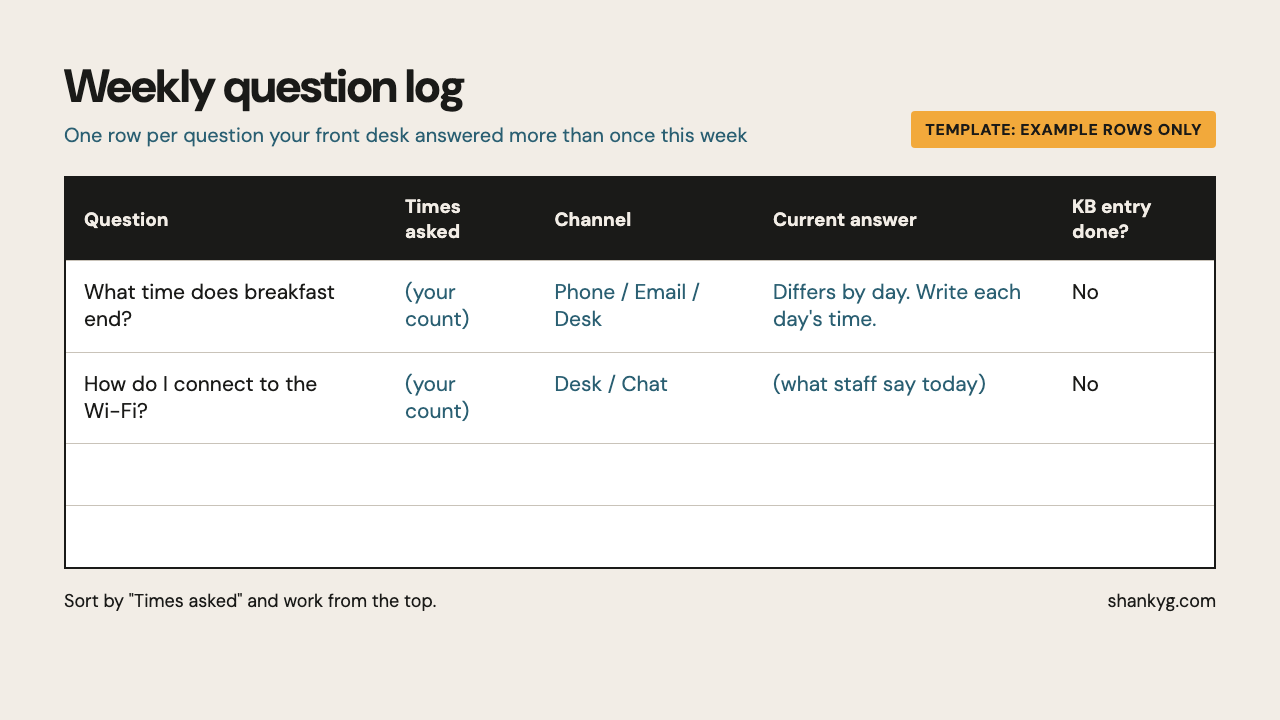
- Question. Write it the way the guest says it.
- Times asked. A rough tally is fine.
- Channel. Phone, email, desk, WhatsApp or a booking site. This shows where questions hide.
- Current answer. Write what your team really says today. If three people give three answers, record all three. For breakfast, write the time for each day.
- KB entry done? Yes or no. This is your to-do list.
Sort by "Times asked" and work from the top.
If you would rather copy and paste, here is the plain version:
WEEK OF: ____________

Question:
Times asked:
Channel (phone / email / desk / chat / booking site):
Current answer (as staff say it today):
KB entry done? (Y / N):
How do you turn a question into a knowledge-base entry?
A knowledge-base entry, or KB entry, is one question with one clear, correct answer. Take the top question on your list and write the answer once, properly.
- Check that it is correct. Times, prices, policies and wording.
- Cover the edge cases. What if a guest arrives after reception closes? What is the rule for late check-out? For breakfast, write each day on its own line, so nobody quotes Friday's time on a Sunday.
- Keep it short. Two to four sentences. If it needs more, split it into two entries.
- Store it in one place. A shared document, a Notion page or a printed sheet at the desk. The tool matters less than having one version.
- Get it approved once. The owner or manager signs it off, and after that nobody has to guess.
One caution for Wi-Fi: write how to connect, and keep door codes, safe codes and anything private out of entries that a guest assistant could ever read.
Do this for one to three entries a week. After a few weeks you have a solid base of answers that new staff can learn from, too.
Where does AI fit after the knowledge base?
Once the answers are written and correct, AI becomes useful. Before that, it just repeats whatever mess you give it, faster.
With a knowledge base in place you can:
- Draft email replies from your own approved answers.
- Write pre-arrival messages that cover the questions guests ask most.
- Set up a simple guest assistant that answers from your written entries, not from guesses.
- Keep a person in the loop for anything going to a guest, at least at the beginning.
I tested exactly this kind of assistant on a fictional hotel, and wrote down where it answers, where it hands over to the front desk, and where it should say no. You can read it here: What Should a Hotel Chatbot Refuse to Do?.
What should you do this Sunday?
- Set a timer for 15 minutes.
- List the questions your front desk answered more than once.
- Turn the top one into a clear, correct answer.
- Repeat each week. Add AI only after the answers exist.
Frequently asked questions
How long should the weekly question log take?
Fifteen minutes. Set a timer and stop when it ends. A short, regular habit works better than one big audit.
Who should do the log?
Whoever runs the front desk or the operation, with input from the team. The people answering the questions know them best.
Do I need special software?
No. A Google Sheet or even a paper notebook works. The value is in writing down the answers, not in the tool.
What counts as a knowledge-base entry?
One guest question and one clear, correct answer, written in two to four sentences. Keep it where your whole team can find it.
Does this only work for hotels?
No. B&Bs, guesthouses, inns, tour operators, restaurants and rentals all get repeat questions. The method is the same.
When should I add AI?
After your top questions have approved answers. AI can then draft replies and power a simple guest assistant from your own entries.
What next?
I put together a free toolkit to help you start: 10 Guest Questions Your Hotel Should Automate First. You enter your email and it is sent to you. If you would rather talk through your own operation, book a free AI Opportunity Check. It is a 20 to 30 minute conversation about how your business works and where the opportunities are.